Guides
Website audit checklist: 25 checks for a small business site
A plain-English website audit you can run in 30 minutes: 25 checks for speed, mobile, SEO, AI search and security, how to fix each one, and a real report explained.

A website audit is a health check for your site. Is it fast? Does it work properly on phones? Can Google and AI assistants read it and describe your business correctly? Is it secure? You don't need to be technical to answer those questions. This checklist covers the 25 checks that matter most for a small business site, in plain English, with how to check each one yourself, what good looks like and how to fix it.
Short on time? Our free website check runs 23 of them on any address in under a minute and shows your score.
What a website audit is, and what it isn't
A website audit looks at the technical health of your site: speed, mobile layout, search basics, AI readability and security. These are the things that decide whether people and search engines can use your site at all.
It is not a judgement of your design taste or your brand. A beautiful site can fail half these checks, and a plain one can pass them all. Think of it as checking the foundations before you redecorate.
Why it matters for a small business
Visitors leave slow sites. Most people browse on phones, often on patchy connections. If your main content takes several seconds to appear, many of them leave before they see it.
Google ranks healthy sites higher. Speed, mobile layout and clear page titles all feed into search ranking.
AI search is the new front door. More people ask ChatGPT, Gemini, Perplexity or Google's AI answers for recommendations. If those tools can't read your site, they can't recommend you.
Small problems cost real money. One leftover setting can hide your whole site from Google. A broken form can lose every enquiry for weeks before anyone notices.
How to run this audit in 30 minutes
Run the free check. Put your home page into our website check. It covers 23 of the 25 checks below and gives you a score out of 100.
Open Google PageSpeed Insights. Test the same page on mobile for the detailed speed breakdown.
Open Google Search Console. If you haven't set it up, do it now. It's free and shows how Google sees your site, including pages it can't index.
Use your phone. Open your site on your own phone over mobile data, not Wi-Fi. Tap every menu item and submit your contact form.
Repeat for your most important page. Usually your main service or product page, the one you most want people to find.
Speed: 5 checks
Speed is the first impression. It is also the area most small business sites fail.
1. Mobile speed score. Google PageSpeed Insights gives each page a score out of 100 on a simulated mid-range phone. Aim for 90 or more; under 50 is a priority. Fix: compress and resize images, remove scripts you don't use, and limit fonts to two families.
2. Main content shows quickly. Google calls this Largest Contentful Paint: the moment the biggest image or heading appears. Aim for under 2.5 seconds. Fix: make the first image smaller, don't hide the main heading behind an animation, and load chat widgets and trackers after the page.
3. The page doesn't jump while loading. Layout shift is when text moves down because an image, banner or ad loads late, and people tap the wrong thing. Fix: give images and embeds a fixed width and height, and avoid banners that push content down.
4. Server responds quickly. The first byte from your server should arrive in well under a second. Fix: better hosting, caching, or a platform with a global network. Our tool uses Google's speed test, which covers this, so it doesn't count it separately.
5. Lightweight HTML. The page's code itself should be under about 300 KB. Pages stuffed with hidden sections, page builders' extra markup or inline graphics get slow on phones. Fix: remove unused sections and move large graphics into image files.
Mobile: 2 checks
6. Set up for phones. The page needs a viewport tag, a line of code that tells phones to show it at the right size. Without it, everything appears tiny and people have to pinch and zoom. Fix: every modern builder adds it; if it's missing, your theme is very old.
7. Images sized for small screens. Phones shouldn't download desktop-sized images. Fix: upload images through your builder normally rather than pasting them in code, so it can create smaller versions automatically.
SEO basics: 10 checks
These are the foundations of being found on Google. None of them is difficult, but they are easy to forget.
8. Google is allowed to list the page. A "noindex" setting left over from development hides your site from Google completely. This is the most expensive mistake on the list. Check: Search Console shows "Excluded by noindex". Fix: turn off the "hide from search engines" setting in your builder.
9. A clear page title. The title shows as the blue link in Google. Keep it between 15 and 65 characters and say what you do and where, for example "Dental clinic in Indiranagar, Bangalore | Smile Studio". "Home" is not a title.
10. Search snippet text. The meta description is the grey text under the link. Write 70 to 165 characters that make someone want to click. Google sometimes rewrites it, but it often uses a good one.
11. One main heading. Each page needs a single H1 heading that matches what the page is about. Several H1s, or none, confuses search engines about the topic.
12. Images described. Alt text tells search engines and screen readers what an image shows. Describe it plainly, such as "Dentist explaining an X-ray to a patient", not "image1.jpg".
13. A sitemap. A sitemap.xml file lists your pages for search engines. Most builders create one automatically. Submit it in Google Search Console and Bing Webmaster Tools.
14. A preferred address. A canonical tag tells Google which version of a page is the real one, so www and non-www, or pages with tracking codes, aren't treated as duplicates.
15. Looks good when shared. Open Graph tags give your page a title and image when someone shares it on WhatsApp, LinkedIn or X. Without them, shared links look bare and get fewer clicks.
16. Language declared. The page code should say which language it is in. It helps search engines show the right page to the right people and helps screen readers pronounce text correctly.
17. No broken links. Click through your menu, footer and main buttons. Broken links waste visitors' time and search engines' crawl time. This is the one check you need to do by hand.
AI search: 5 checks
AI assistants now answer a lot of questions that used to be Google searches, including "who's a good accountant near me?". These checks help them find and describe you accurately, and many sites haven't done them yet.
18. AI assistants may read the site. Your robots.txt file can block AI crawlers such as GPTBot or ClaudeBot. Make sure you aren't blocking the ones you want to be found by.
19. Content readable without JavaScript. Some crawlers don't run scripts. If your main text only appears after JavaScript runs, they see an empty page. Fix: use a builder that puts text in the page itself, as Framer, Webflow, Shopify and most WordPress themes do.
20. Structured business details. Schema markup describes your business in a format machines understand: name, address, opening hours, services and prices. It helps both Google and AI tools state the facts about you correctly.
21. Sections with headings. Clear H2 headings such as "Prices", "Opening hours" and "How it works" make it easy for AI to quote the right part of your page.
22. An llms.txt file. A short plain-text file at yoursite.com/llms.txt that summarises your business and key pages for AI tools. Optional today and quick to add.
Security: 3 checks
23. HTTPS. The padlock in the address bar. Browsers warn visitors away from sites without it, and forms without it aren't safe. Every modern host provides it free.
24. HTTP sends people to HTTPS. Typing your address without "https" should still land on the secure version. Test it by typing http://yourdomain.com.
25. Browsers told to always use HTTPS. A security setting called HSTS tells browsers never to use the insecure version. Most hosts can switch it on in one click.
Reading a real report: our own site
We ran the check on zegwastudio.com while writing this guide. It scored 85 out of 100: 19 checks passed and 4 need work.

The score card shows where the points went. SEO basics, AI search and security are strong. Speed is the weak area at 54, which pulls the total down because speed is a quarter of the score.
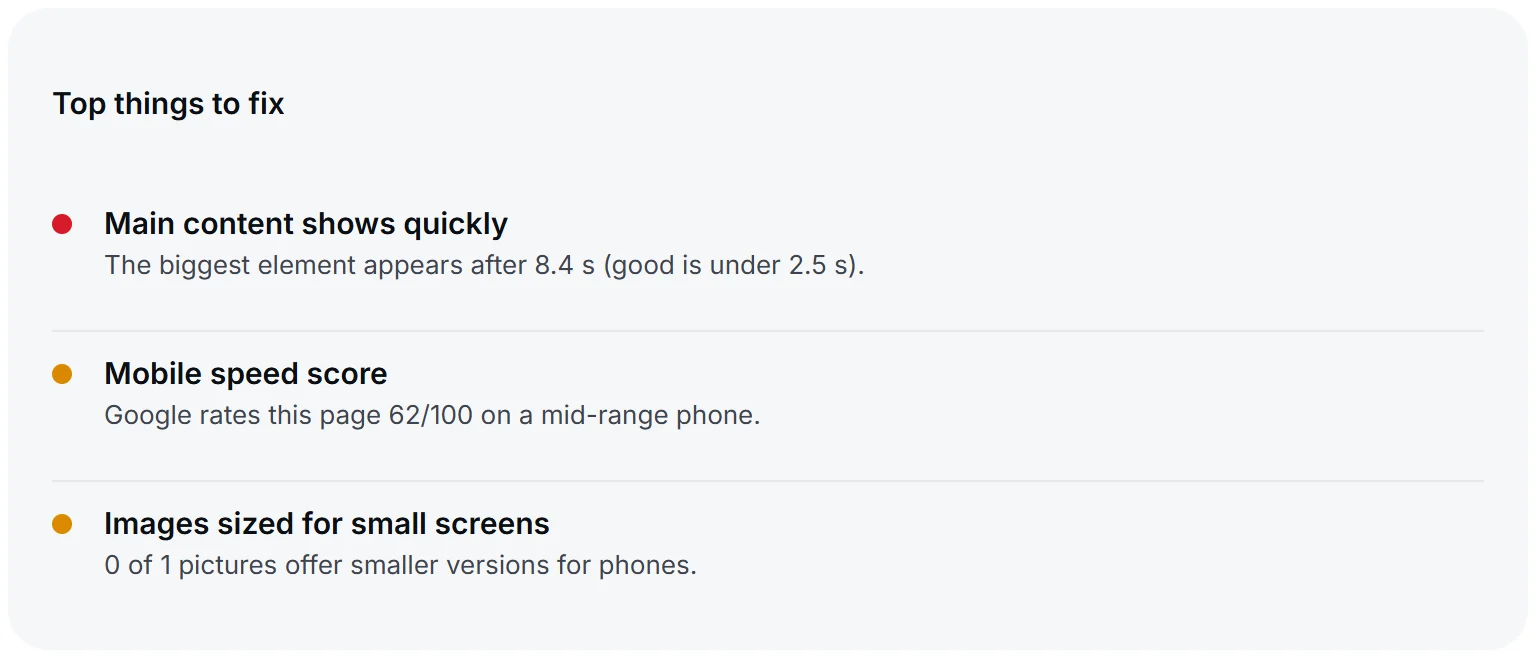
The top fixes are specific. On Google's simulated mid-range phone, our main content appears late and the mobile speed score is 62. On a fast connection, the same page appears in about a second. The test is deliberately strict, because many of your visitors have slower phones and connections than you do. Even sites built by people who do this for a living have things to fix, which is exactly why it's worth checking regularly.
What to fix first
Not every check is equal. Work in this order:
Anything that hides or endangers your site: a noindex setting (check 8), or missing HTTPS (checks 23 and 24). Fix these today.
Broken forms and links: every lost enquiry is lost money.
Mobile speed under 50 and slow main content. Most visitors are on phones.
Titles and descriptions on your key pages. Quick to fix and directly affect clicks from Google.
The AI search checks. Quick wins that many sites haven't made yet.
Everything else, as part of normal upkeep.
Fixes by platform
Framer
Titles, descriptions and share images are in each page's settings. The site-wide language, search engine visibility and custom code are in Site Settings. Framer handles HTTPS, the sitemap and image sizes for you. Speed problems usually come from heavy custom components, embeds or large animations.
WordPress
An SEO plugin such as Yoast or Rank Math handles titles, descriptions, the sitemap and schema. Speed problems usually come from too many plugins, a heavy theme or cheap hosting. A caching plugin and an image compression plugin fix a lot.
Shopify
Titles and descriptions are in each product and page's "Search engine listing" section. Shopify handles HTTPS and the sitemap. Apps are the usual cause of slowness, so remove the ones you don't use. Large hero videos and sliders are the next suspect.
Wix and Squarespace
Both handle HTTPS, sitemaps and mobile layouts automatically. Check the SEO settings on every page, compress images before uploading, and avoid stacking many third-party widgets.
How often to audit
Run a quick check every three months, and always after a redesign, a new plugin or app, a change of hosting, or a big content update. Those are the moments things quietly break. Set a calendar reminder; it takes ten minutes once you know what you're looking for.
Free check or professional audit?
A free check finds most technical problems on a small business site. A professional audit adds what a tool can't judge:
whether your copy explains your offer clearly in the first few seconds;
whether your pages lead people to enquire or buy;
how you compare with the competitors who rank above you;
which keywords you could realistically win.
Start with the free check. If the technical basics are sound and you still aren't getting enquiries, that's when the deeper review pays off.
Questions people ask
Is a free website audit enough?
For the technical basics, usually yes. It won't tell you whether your message is clear or your pages convert, which is where a person's review helps.
What does a website audit cost?
Our check is free. If you want the problems fixed, we quote a fixed price, and many fixes take a few hours. A full redesign starts at $1,500 (₹40K) for a landing page or $5,000 (₹1.2L) for a business website. See what a website costs in 2026.
Will fixing these improve my Google ranking?
They remove what holds you back. Ranking also depends on your content and on other sites linking to you, but a site that fails the basics struggles however good its content is.
How long does it take to fix everything?
Settings like titles, descriptions and the language tag take minutes each. Speed work takes longer, from a few hours for image compression to a few days if the site needs restructuring.
Why is my speed score different every time I test?
Speed tests simulate a phone on a slow network, and small differences in server response and network conditions change the result. Test two or three times and look at the trend, not one number.
Do I need to do the AI search checks?
You don't have to, but they're quick and an easy way to stand out while many sites ignore them. As more people ask AI tools for recommendations, being readable by them matters more each month.
See your score: run the free website check, or send a brief and we'll fix what it finds at a fixed price.
Planning a build? See Website development company in Bangalore for prices, timelines and what is included.